Author: implementations

Archive Pages

Archive Pages are pages that include lists of content that are automatically generated by the platform. The Archive Page settings allow you to control which list template should be used for each Archive Page’s list. These lists include: Category & Tag Archive Page Lists These are the pages that WordPress automatically generates for every category and tag, such as ‘category/news/’. Author Bio…

List Templates

dList Templates control the layout of Lists on landing pages.  The List Templates define: What information is displayed for each item, or card, in the List How cards are arranged on the page To review, edit or create List Templates, go to Lists > All List Templates. You can also access a specific List Template on a page by opening the…

Links

Links let you: Put a link to an external site in a List Put a link to a page in a List Make an article headline that displays in a List that’s different from the article’s title Create A Link To create a link: Go to Links Click Add New Give the Link a Title Give the Link a Subtitle…

Content Wrappers

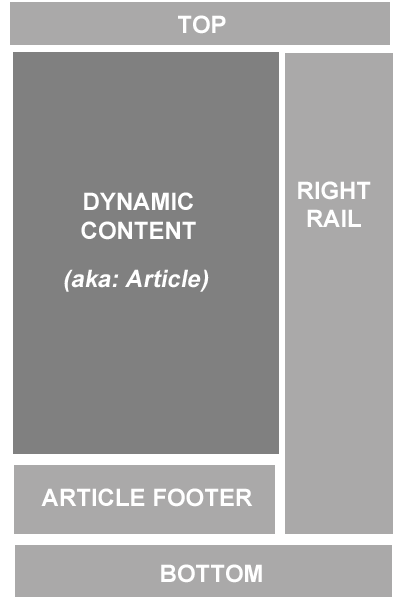
Many of the pages on your site, such as article pages, are dynamically created as the website visitor requests that content. The objects that appear around the dynamic content, such as ads and extra modules, are controlled via Content Wrappers. A Content Wrapper includes up to four containers, as shown in Diagram A: Diagram A Edit Your Default Wrapper During…

Issues

Issues are the most common way to organize articles on your website. You can have multiple publications, and each publication can have multiple issues. You can then designate articles that belong to each issue. Articles can also standalone, and not belong to any issue. Create an Issue To create an issue, you must first have the Magazine created. Under Issues,…

Launch Day: What To Expect

Editing your site’s DNS record is the step that will point your URL to your new site. As the DNS change starts to propagate, you’ll start to see your URL point to your new site on different devices. It could take about a day before you see your new site appear on all devices. Changing your site’s DNS is more…

Launch Preparation

Before your site launches, you’ll have a Quality Assurance period to examine your site and flag any issues. Your project coordinator will share a spreadsheet with you and your team to ensure all pages have been QA’ed by staff and are approved for launch. The Rayos Team will ask you to examine items including: Is any content missing? Are any…

Web Advertising Capabilities

The Rayos Platform supports Google’s Ad Manager ad server and uses IAB standard ad placements. Ads will appear across desktop and mobile web devices on your responsive web site. Once you provide us admin access to you Ad Manager account,  the Rayos Team will complete the initial work to set up ads on your site as described below.The following ad…

Grant Rayos Team Access to Ad Manager

The Rayos Platform requires an Ad Manager Small Business or Premium account to traffic ads to your website. The account may be a corporate account (shared among other publishers within your organization), but may not belong to a previous provider. Note: Google DFP is now called Ad Manager. If you previously had a DFP account, it is now an Ad…